Upcoming Maintenance - October 21st at 8PM: Please note that our service will be temporarily interrupted for some maintenance for about 3 hours on October 21st starting at 8PM EDT. During this period, the application will be inaccessible and some statistics may not be compiled. Also, some functionalities may be interrupted and any scheduled emails will be sent once the service is restored.
Close
Security Notice - PHP Vulnerabilities Patched: Following the recent announcement of critical PHP security vulnerabilities, our technical team took action as soon as the security update was released. The necessary fixes have been applied to our infrastructure, and the update is complete.
Close

Archive a scenario

Use the "Archive" function to permanently end a scenario.

When a scenario is archived every task that is associated with that scenario will stop. However, it is still possible to see the statistics for that scenario. If you wish to re-activate the scenario,you will need to duplicate it and then activate the copy. Click here to learn how to re-use an archived scenario.

To archive a scenario:

  1. Go to Marketing automation.
     
  2. Click on the 3 dots on the right-hand side of the scenario and select "Archive".
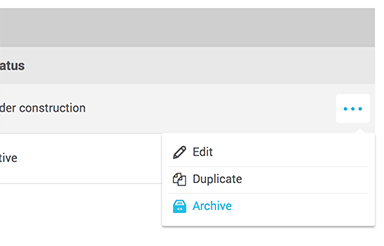

     
  3. Click "Yes" to confirm.

Please note: contrary to when putting a scenario on hold, archiving a scenario does not allow contacts that were already in to pursue their journey. It stops everything.

Top